Jason Bock
| Home | Biography | Speaking | Articles | Books | Music |
Anagrams and Prime Numbers
Abstract
As developers, we come across unique ways to implement algorithms that may seem intriguing, but their novelty must be challenged with performance analysis. In this article, I’ll discuss ways to determine if words are anagrams using prime numbers. I’ll compare this approach to other solutions, and I’ll use Benchmark.NET to analyze their practical usability.
Introduction
Every developer I’ve met wants users to be happy. They want to write code that’s fast and create application features that don’t hang or incur many memory allocations. No one wants to see their application come to a crashing halt.
While that goal is a commendable one, it takes research and diligence to achieve it. One of our ISMs within Rocket Mortgage, is “Obsessed with finding a better way.” Finding new ways to improve performance in a code base requires one to explore and try different implementations.
Sometimes these results may not lead to a desirable result but that journey may uncover new techniques for use in future code improvements. The first step on the journey is that I must first benchmark and examine the results and see what it’s telling me. Sometimes I look to optimize on speed or memory, or both, but I always need to start from performance data derived from a set of sample data.
I’ll use an example that determines if two strings are anagrams - a word, phrase or sentence formed from another by rearranging its letters. For example, “trace” is an anagram of “crate.” However, “trace” isn’t an anagram of “carts.”
Arguably, this is a contrived example and likely wouldn’t be used in a real application, but it’s the setup of the situation that matters.
Finding Anagrams Using Sorting
To write this in C#, I’d need to compare the contents of two strings. For this article, I’m not concerned with whether the contents are actual English words, and I’m going to assume that the inputs only contain lowercase letters. Listing 1 shows one way to implement it:
Listing 1 - Using Sorted Character Arrays To Find Anagrams
public static bool AreAnagramsViaArraySort(string value1, string value2)
{
  if (value1 is null) throw new ArgumentNullException(nameof(value1));
  if (value2 is null) throw new ArgumentNullException(nameof(value2));

  if (value1.Length != value2.Length) { return false; }

  var content1 = value1.ToCharArray();
  Array.Sort(content1);
  var content2 = value2.ToCharArray();
  Array.Sort(content2);

  for (var i = 0; i < value1.Length; i++)
  {
    if(content1[i] != content2[i]) { return false; }
  }

  return true;
}
First, I ensure the strings aren’t null. Next, I compare the length of the strings, and if they’re not the same, I return false. Next, I get the contents of each string via ToCharArray() and sort those arrays using Array.Sort(). Finally, I use a for loop to compare the values in the arrays. If all characters match, I return true. (Note that strings are immutable in .NET, so I must get a copy of the string’s contents to sort the characters.)
Using Prime Numbers For Anagrams
You can also use prime numbers to determine if two strings are anagrams, a technique I learned via this tweet. The technique works by mapping a prime number to a character. These prime numbers are multiplied together, and if the two results are the same, the strings are anagrams. For brevity’s sake, I’ll call these results “anagram numbers.”
Here’s a simple way to illustrate how the algorithm works. First, I map each character from A to Z to a prime number in ascending order, so A maps to two, B maps to three, C maps to five, and so on.
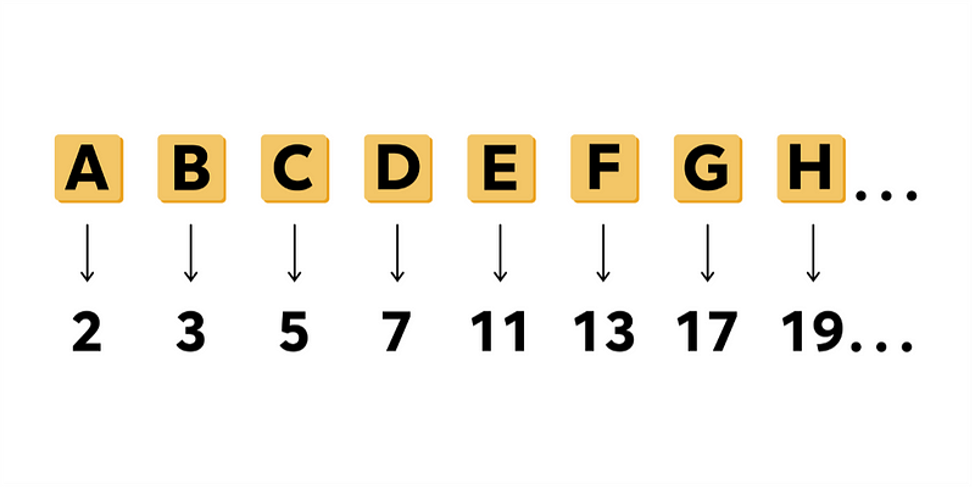
Then, I take two strings, “cat” and “tab,” and multiply the numbers that correspond to each letter to calculate their total “anagram number.” The anagram number for “cat” is 5 * 2 * 71, or 710. For “tab”, it’s 71 * 2 * 3, or 426.
This means the strings aren’t anagrams.
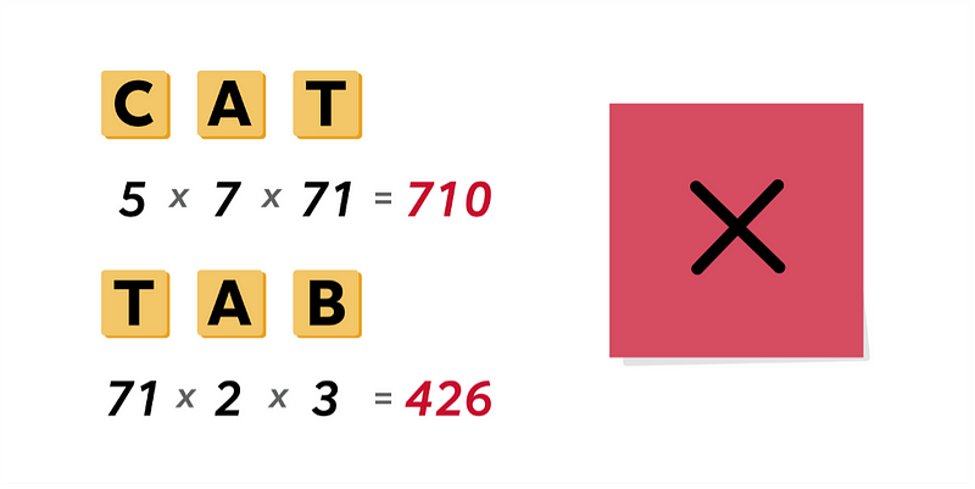
However, “tab” and “bat” will have the same anagram number, indicating they are anagrams.
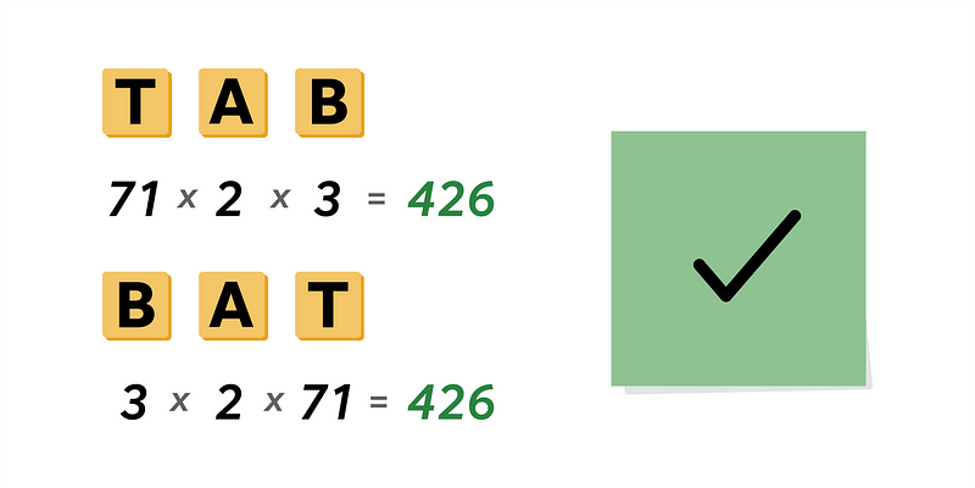
One advantage of this approach is that I don’t have to make a copy of the string and sort that array. I just iterate the string’s characters in-place and figure out the anagram number.
However, there’s a catch. If I calculate the anagram number for “battements,” it’s 3 * 2 * 71 * 71 * 11 * 41 * 11 * 43 * 71 * 67, or 30,692,960,597,706. The maximum value that an unsigned integer, or uint, can hold is 4,294,967,295. I’d end up causing overflows, which I can’t have using this algorithm. The maximum value for an unsigned long, or ulong, goes to 18,446,744,073,709,551,615, so that would hold it. But “pneumonoultramicroscopicsilicovolcanoconiosis,” one of the longest English words, has an anagram number so large that it would easily overflow an unsigned long. Fear not, there is a way to store large integer values in C# via the BigInteger type. This type can store integer values with thousands of digits. Therefore, I’ll use a BigInteger in my calculations.
In Listing 2, I’ll start by implementing character-to-prime number mapping with a dictionary.
Listing 2 - Mapping Characters To Prime Numbers
private static readonly Dictionary<char, BigInteger> mappings = new()
{
  { 'a', 2 },
  { 'b', 3 },
  { 'c', 5 },
  // ... values deleted for brevity ...
  { 'x', 89 },
  { 'y', 97 },
  { 'z', 101 },
};
Next, I’ll look up the prime number for each character and multiply them together to get the anagram number, as you can see in Listing 3:
Listing 3 - Computing The Anagram Number
public static BigInteger GetAnagramNumber(this string self)
{
  if (self is null) throw new ArgumentNullException(nameof(self));

  var value = BigInteger.One;

  foreach (var piece in self)
  {
    value *= AnagramComparisons.mappings[piece];
  }

  return value;
}
Then, I’ll create another method, shown in Listing 4, to compare two anagram numbers to see if they’re anagrams.
Listing 4 - Comparing Anagram Numbers
public static bool AreAnagramsViaGetAnagramNumber(string value1, string value2)
{
  if (value1 is null) throw new ArgumentNullException(nameof(value1));
  if (value2 is null) throw new ArgumentNullException(nameof(value2));

  return value1.GetAnagramNumber() == value2.GetAnagramNumber();
}
Using Benchmark.NET for Performance Analysis
Now I have two approaches to determine if two strings are anagrams, but which one is better? I need a way to compare them to see which one is faster and which one consumes less memory. In Listing 5, I created a class that contains two tests that Benchmark.NET will analyze.
Listing 5 - Create a Benchmark.NET Test Class
[MemoryDiagnoser]
public class AreAnagrams
{
  public IEnumerable<object[]> GetArguments()
  {
    yield return new[] { "cdeab", "daebc" };
    yield return new[] { "mentsbatte", "stnemettab" };
    yield return new[] { "pneumonoultramicroscopicsilicovolcanoconiosis", "silicovolcanoconiosispneumonoultramicroscopic" };
  }

  [Benchmark(Baseline = true)]
  [ArgumentsSource(nameof(AreAnagrams.GetArguments))]
  public bool AreAnagramsViaArraySort(string value1, string value2) =>
    AnagramComparisons.AreAnagramsViaArraySort(value1, value2);

  [Benchmark]
  [ArgumentsSource(nameof(AreAnagrams.GetArguments))]
  public bool AreAnagramsViaGetAnagramNumber(string value1, string value2) =>
    AnagramComparisons.AreAnagramsViaGetAnagramNumber(value1, value2);
}
If you’ve never used Benchmark.NET before, I highly recommend you familiarize yourself with it. It’s so much more reliable than any performance testing approaches a developer may try with timers, stopwatches or DateTime differences and it’s easy to use.
I use a MemoryDiagnoserAttribute on the class to tell Benchmark.NET to track allocations for each test method. These test methods are marked with the BenchmarkAttribute. To run the tests with different inputs, I create test data through the GetArguments() method. I specify that GetArguments() is the source for test data via the ArgumentsSourceAttribute. Having a consistent set of test data makes it easier for me to write new test methods for different implementations that will be exercised in the same way.
Now I have two tests in place, and Listing 6 shows how the tests are run from the console application:
Listing 6 - Running Benchmarks
BenchmarkRunner.Run<AreAnagrams>();
Benchmark.NET takes a bit of time to run, but once it completes, I’ll get a good set of data, as shown in Listing 7:
Listing 7 - Benchmark.NET Test Results
| Method | value1 | value2 | Mean | Allocated |
|---|---|---|---|---|
| AreAnagramsViaArraySort | cdeab | daebc | 47.62 ns | 80 B |
| AreAnagramsViaGetAnagramNumber | cdeab | daebc | 156.40 ns | - |
| AreAnagramsViaArraySort | mentsbatte | stnemettab | 81.22 ns | 96 B |
| AreAnagramsViaGetAnagramNumber | mentsbatte | stnemettab | 416.59 ns | 424 B |
| AreAnagramsViaArraySort | pneum(…)iosis [45] | silic(…)copic [45] | 379.44 ns | 240 B |
| AreAnagramsViaGetAnagramNumber | pneum(…)iosis [45] | silic(…)copic [45] | 2,736.99 ns | 7,104 B |
(By default, Benchmark.NET reports more columns than what you see here. I’ve removed the Error, StdDev, Ratio, and RatioSD columns for brevity.)
These results didn’t surprise me. Array.Sort() is highly optimized, and if the strings are different by one character near the beginning of the array, the code can break out of the loop quicker. The anagram number approach forces me to visit every character in both strings. Also, BigInteger’s internal representation of a number uses an uint array, and it’s immutable, so I’ll create more allocations the longer the strings get and the number of multiplications increases. Using Array.Sort(), the only allocation I need is for copying the string contents, which I must do, because strings are immutable, and I can’t sort them in place.
(Side Note: As I run Benchmark.NET tests to look at different implementations, I’ll see that sometimes no allocations are reported for the anagram number approach. As I mentioned,
BigIntegeruses an array to represent the number, but there are cases where optimizations are made to eliminate this array allocation. For example, look at the way the constructors are implemented inBigInteger. If the starting value is less thanint.MaxValue, the array is set tonull, and the representation is stored in anintfield called_sign. All theBigIntegeroperators will check to see if the array isnullor not and perform the operations using either theintfield or theuintarray. So, if yourBigIntegervalues are small, you won’t incur the array allocations.)
Yet, there’s a sign of hope for the anagram number approach. For small inputs, Benchmark.NET reports no allocations. With anagram numbers, I don’t need to copy the contents of the strings. As the strings get larger, I start creating more allocations via the BigInteger type. Let’s see if I can reduce those allocations.
Improving Anagram Number Calculations
Can I improve the situation for my anagram number algorithm? To start, one thing I can do is reduce the number of BigInteger allocations I make. I can make my mappings dictionary contain ulong values, as shown in Listing 8:
Listing 8 - Using ulong Types To Store Prime Numbers
private static readonly Dictionary<char, ulong> mappingsOptimizedUsingUInt64 = new()
{
  { 'a', 2 },
  { 'b', 3 },
  { 'c', 5 },
  // ... Values ommited for brevity ...
  { 'x', 89 },
  { 'y', 97 },
  { 'z', 101 },
};
The largest possible anagram number I can store in a ulong is nine Z characters in a row. This is 101 ^ 9 or 1,093,685,272,684,360,901. This fits into a ulong, but another Z would overflow the value. So, I use a ulong to do the multiplications, and when I get close to that maximum value, I convert it to a BigInteger and multiply that to get my return value. Listing 9 shows what that looks like:
Listing 9 - Minimizing BigInteger Allocations
public static BigInteger GetAnagramNumberMinimizeBigIntegerAllocations(this string self)
{
  if (self is null) throw new ArgumentNullException(nameof(self));

  const int MaxCount = 9;

  var currentValue = 1ul;
  var value = BigInteger.One;

  for (var i = 0; i < self.Length; i++)
  {
    currentValue *= AnagramComparisons.mappingsOptimizedUsingUInt64[self[i]];
    var currentValueIndex = i % MaxCount;

    if ((i == self.Length - 1) || (currentValueIndex == 0 && i > 0))
    {
      value *= currentValue;
      currentValue = 1ul;
    }
  }

  return value;
}
Listing 10 contains the results from the second execution of the benchmark tests.
Listing 10 - Benchmark.NET Test Results, Take Two
| Method | value1 | value2 | Mean | Allocated |
|---|---|---|---|---|
| AreAnagramsViaArraySort | cdeab | daebc | 48.01 ns | 80 B |
| AreAnagramsViaGetAnagramNumber | cdeab | daebc | 149.41 ns | - |
| AreAnagramsViaGetAnagramNumberMinimizeBigIntegerAllocations | cdeab | daebc | 93.68 ns | - |
| AreAnagramsViaArraySort | mentsbatte | stnemettab | 83.37 ns | 96 B |
| AreAnagramsViaGetAnagramNumber | mentsbatte | stnemettab | 413.35 ns | 424 B |
| AreAnagramsViaGetAnagramNumberMinimizeBigIntegerAllocations | mentsbatte | stnemettab | 206.99 ns | 208 B |
| AreAnagramsViaArraySort | pneum(…)iosis [45] | silic(…)copic [45] | 385.70 ns | 240 B |
| AreAnagramsViaGetAnagramNumber | pneum(…)iosis [45] | silic(…)copic [45] | 2,805.75 ns | 7,104 B |
| AreAnagramsViaGetAnagramNumberMinimizeBigIntegerAllocations | pneum(…)iosis [45] | silic(…)copic [45] | 1,049.93 ns | 1,248 B |
It’s getting better. I’ve reduced my memory allocations, and it’s getting faster, although I’m still not beating the Array.Sort() approach.
You may run into a bunch of characters which are at the beginning of the alphabet. Even after nine characters, I wouldn’t overflow a ulong with the next multiplication. So, instead of always doing a ulong-to-BigInteger conversion every nine characters, I’ll just check the current value to see if it’s in danger of overflowing. This change is illustrated in Listing 11:
Listing 11 - Further BigInteger Allocation Reduction
public static BigInteger GetAnagramNumberRemoveMaxCount(this string self)
{
  if (self is null) throw new ArgumentNullException(nameof(self));

  const ulong MaximumValue = 182_641_030_432_767_837;

  var currentValue = 1ul;
  var value = BigInteger.One;

  for (var i = 0; i < self.Length; i++)
  {
    currentValue *= AnagramComparisons.mappingsOptimizedUsingUInt64[self[i]];

    if ((i == self.Length - 1) || (currentValue > MaximumValue))
    {
      value *= currentValue;
      currentValue = 1ul;
    }
  }

  return value;
}
Listing 12 shows the results from the third Benchmark.NET test run.
Listing 12 - Benchmark.NET Test Results, Take Three
| Method | value1 | value2 | Mean | Allocated |
|---|---|---|---|---|
| AreAnagramsViaArraySort | cdeab | daebc | 47.71 ns | 80 B |
| AreAnagramsViaGetAnagramNumber | cdeab | daebc | 147.63 ns | - |
| AreAnagramsViaGetAnagramNumberMinimizeBigIntegerAllocations | cdeab | daebc | 93.17 ns | - |
| AreAnagramsViaGetAnagramNumberRemoveMaxCount | cdeab | daebc | 86.16 ns | - |
| AreAnagramsViaArraySort | mentsbatte | stnemettab | 82.76 ns | 96 B |
| AreAnagramsViaGetAnagramNumber | mentsbatte | stnemettab | 408.84 ns | 424 B |
| AreAnagramsViaGetAnagramNumberMinimizeBigIntegerAllocations | mentsbatte | stnemettab | 203.28 ns | 208 B |
| AreAnagramsViaGetAnagramNumberRemoveMaxCount | mentsbatte | stnemettab | 187.67 ns | 208 B |
| AreAnagramsViaArraySort | pneum(…)iosis [45] | silic(…)copic [45] | 371.21 ns | 240 B |
| AreAnagramsViaGetAnagramNumber | pneum(…)iosis [45] | silic(…)copic [45] | 2,733.78 ns | 7,104 B |
| AreAnagramsViaGetAnagramNumberMinimizeBigIntegerAllocations | pneum(…)iosis [45] | silic(…)copic [45] | 1,015.59 ns | 1,248 B |
| AreAnagramsViaGetAnagramNumberRemoveMaxCount | pneum(…)iosis [45] | silic(…)copic [45] | 969.30 ns | 976 B |
It’s not a significant improvement, but there’s a slight performance win, and with the large string values, I reduce the memory allocation.
Rather than use a Dictionary<char, ulong>, I can use a switch statement with the most common letters in the alphabet at the beginning. Listing 13 contains this implementation:
Listing 13 - Using A switch Statement For Character-To-Prime-Number Mapping
public static BigInteger GetAnagramNumberUsingSwitchLetterDistribution(this string self)
{
  if (self is null) throw new ArgumentNullException(nameof(self));

  const ulong MaximumValue = 182_641_030_432_767_837;

  var currentValue = 1ul;
  var value = BigInteger.One;

  for (var i = 0; i < self.Length; i++)
  {
    currentValue *= self[i] switch
    {
      'e' => 2,
      's' => 3,
      'i' => 5,
      // ... Values ommitted for brevity ...
      'x' => 89,
      'j' => 97,
      'q' => 101,
      _ => throw new NotSupportedException()
    };

    if ((i == self.Length - 1) || (currentValue > MaximumValue))
    {
      value *= currentValue;
      currentValue = 1ul;
    }
  }

  return value;
}
Listing 14 shows the final results from Benchmark.NET.
Listing 14 - Benchmark.NET Test Results, Take Four
| Method | value1 | value2 | Mean | Allocated |
|---|---|---|---|---|
| AreAnagramsViaArraySort | cdeab | daebc | 48.83 ns | 80 B |
| AreAnagramsViaGetAnagramNumber | cdeab | daebc | 163.81 ns | - |
| AreAnagramsViaGetAnagramNumberMinimizeBigIntegerAllocations | cdeab | daebc | 94.80 ns | - |
| AreAnagramsViaGetAnagramNumberRemoveMaxCount | cdeab | daebc | 89.00 ns | - |
| AreAnagramsViaGetAnagramNumberUsingSwitchLetterDistribution | cdeab | daebc | 45.17 ns | - |
| AreAnagramsViaArraySort | mentsbatte | stnemettab | 82.16 ns | 96 B |
| AreAnagramsViaGetAnagramNumber | mentsbatte | stnemettab | 409.39 ns | 424 B |
| AreAnagramsViaGetAnagramNumberMinimizeBigIntegerAllocations | mentsbatte | stnemettab | 204.41 ns | 208 B |
| AreAnagramsViaGetAnagramNumberRemoveMaxCount | mentsbatte | stnemettab | 186.78 ns | 208 B |
| AreAnagramsViaGetAnagramNumberUsingSwitchLetterDistribution | mentsbatte | stnemettab | 103.29 ns | 208 B |
| AreAnagramsViaArraySort | pneum(…)iosis [45] | silic(…)copic [45] | 365.94 ns | 240 B |
| AreAnagramsViaGetAnagramNumber | pneum(…)iosis [45] | silic(…)copic [45] | 2,644.05 ns | 7,104 B |
| AreAnagramsViaGetAnagramNumberMinimizeBigIntegerAllocations | pneum(…)iosis [45] | silic(…)copic [45] | 1,013.43 ns | 1,248 B |
| AreAnagramsViaGetAnagramNumberRemoveMaxCount | pneum(…)iosis [45] | silic(…)copic [45] | 969.49 ns | 976 B |
| AreAnagramsViaGetAnagramNumberUsingSwitchLetterDistribution | pneum(…)iosis [45] | silic(…)copic [45] | 419.64 ns | 688 B |
My speed is close to what Array.Sort() can do, and I’ve reduced the amount of memory allocation, although there’s still room for improvement there. However, as I mentioned before, the way BigInteger is designed, I don’t have a way to reduce those allocations. A BigIntegerBuilder may help in reducing allocations, but that feature isn’t slated for .NET 6, so the earliest we’d see this feature is 2023.
Conclusion
In this article, I investigated different techniques to determine if two strings are anagrams. I compared my approach with “anagram numbers” with another one using sorted arrays and then came up with ways to improve its performance characteristics. My intent wasn’t to find a way to beat Array.Sort(). I suspected this was always going to be the best way. This is exactly why we do performance testing. Hunches and guesses simply aren’t good enough.
I also demonstrated that, for small strings, the anagram number technique has promise. On some occasions, specific algorithms are necessary. The late K. Scott Allen did a great presentation highlighting areas in the C# compiler where specialized implementations are used to improve performance. If you have a hot spot in your code, it may be worth the time to use somewhat unorthodox solutions.
Published: 07.07.2021