Jason Bock
| Home | Biography | Speaking | Articles | Books | Music |
Mirroring in WinForms and Owner-Drawn Strings
Continuing down the wonderful road of l10n and i18n, I’ve run across the problem of mirroring in WinForms. Now, I’ve found an article that shows a nice workaround, and I’ve used the code as a starting point to implement mirroring and RightToLeft property management on child controls correctly, but I’ve run into a snag with owner-drawn text. Here’s some code you can use to see what the problem is yourself. All you need to do is make a form and use this code to update the .cs file:
public class TestForm : System.Windows.Forms.Form
{
  private const int WS_EX_LAYOUTRTL = 0x400000;
  private const int WS_EX_NOINHERITLAYOUT = 0x100000;

  private System.ComponentModel.Container components = null;

  public TestForm()
  {
    this.InitializeComponent();
  }

  protected override void Dispose( bool disposing )
  {
    if( disposing )
    {
      if(components != null)
      {
        components.Dispose();
      }
    }
    base.Dispose( disposing );
  }

  protected override CreateParams CreateParams
  {
    get
    {
      CreateParams creationParameters = base.CreateParams;
      creationParameters.ExStyle =
        creationParameters.ExStyle | MirroredUtilities.WS_EX_LAYOUTRTL |
        MirroredUtilities.WS_EX_NOINHERITLAYOUT;
      return creationParameters;
    }
  }

  protected override void OnPaint(PaintEventArgs e)
  {
    base.OnPaint(e);
    string message = "Draw this text.";
    Font font = this.Font;
    Brush brush = new SolidBrush(Color.DarkRed);
    RectangleF messageArea = new RectangleF(8, 8, this.Width, 24);
    e.Graphics.DrawString(message, font, brush, messageArea);
  }

  //  Windows Form Designer generated code goes here...
}
If all is well, when you run the form you should see something like this:
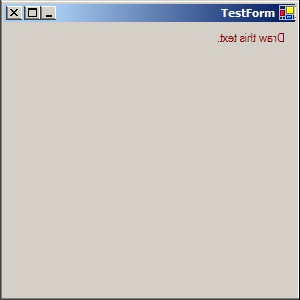
See the problem? The text’s position is correct, but it’s mirrored. That’s not what I want. However, if I don’t mirror the form, then I lose the benefits of having any controls on the form being mirrored, which is highly desirable when your target culture reads right to left ;). So is there a way I can do owner-drawn text on a mirrored form the correct way? [1] If you have any suggestions, please let me know.
[1] I also tried setting the FormatFlags property to DirectionRightToLeft on a StringFormat object and pass that into DrawString(), but that didn’t help. In fact, that made it “worse” - the interested reader is encouraged to try it out themselves :).
Published: 12.08.2004 02:38:21 PM CST