Jason Bock
| Home | Biography | Speaking | Articles | Books | Music |
Put Your Classes on a Diet
What is Wrong With This Code?
Language: Visual Basic
' Arguments deleted for brevity.
Private Function RunCommandLine(pProjectType As String) As Boolean

Select Case pProjectType
  Case "C++"
    ' Do C++ compile.
  Case "J++"
    ' Do J++ compile.
  Case "ASP"
    ' Do ASP compile, although it's currently not used.
  Case Else
End Select

End Function
This method, RunCommandLine(), is in a class called CProjectBuilder, which is used to build projects as part of a configuration utility. The intent of the class is to allow different project types to be compiled during a build process. There’s more code here than what I’m presenting, but this snippet demonstrates why this class is in need of refactoring.
So far, there are three build types supported in CProjectBuilder, but what happens if I need to add another project type? If this tool needs to support C#/.NET projects, I need to open the class file, add the code in the case statement, and recompile (and test, of course). Or, what if the code that compiles C++ projects doesn’t work? Same situation, but in this case, I have the danger of accidentally disturbing code that has nothing to do with a C++ compile.
See the problem? The class has too many responsibilities, and it can only get worse. True, CProjectBuilder should be responsible for project compilation, but why should it handle all kinds of project types? The class is overburdened and prone to maintenance mistakes.
Note: Although my main issue is with the design of the class, there’s three other minor problems about this code. One, it uses a
select casestatement to determine what kind of functionality it should perform, which is usually a sign that the class needs to be refactored into smaller classes. This is not a rule set in stone, but it’s a good indicator that a redesign is in order. Second, the select statement is based on values that are “magic” values - i.e. they’re not constants or enumerations. I always try to move these values into enumeration values or constants. There’s no reason that these values should be created on the fly. Third, there’s an option to compile ASP code. Now, how does one compile script? OK, I know there are ways to “pre-compile” ASPs in the sense that you get the generated HTML and store that in a cache, but I thought that was an odd option to have, especially since the method doesn’t do anything with that option if it’s given.
This is something that I’ve done in the past, and I’ve seen others do it as well. A class is created that has good intentions, but over time the class collapses under its own weight. The classic example of this is what Arthur Riel calls in his book, “Object-Oriented Design Heuristics”, the “god class” - that is, a class with so many methods it ends up doing virtually everything in the system. I admit that I did this on my first project that used classes, and it got ugly. If CProjectBuilder isn’t changed, it has the potential of taking on too much work, thereby becoming a nightmare to alter in the future.
Possible Solutions
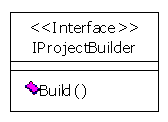
This isn’t a problem with the code or the language used; it’s really a design problem. To start, I propose that we first create an interface called IProjectBuilder that has a Build() method, like this:
Then, create the implementation classes as needed. For example, here’s a class diagram of some classes I can envision having in a configuration tool:
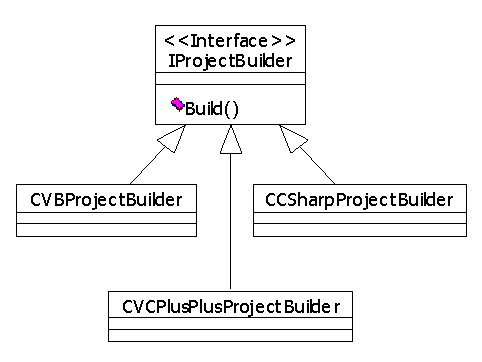
Now each class is responsible for one, and only one, project type. Furthermore, you can add these classes to different COM servers; They don’t have to be in the same component. This is what the client code that uses these classes might look like:
Dim oCSharpProject As IProjectBuilder
Dim oVBProject As IProjectBuilder

Set oCSharpProject = CreateObject("SomeProject.CCSharpProjectBuilder")
Set oVBProject = CreateObject("AnotherProject.CVBProjectBuilder")

' Assume the objects have been set up properly for a build...
oCSharpProject.Build
oVBProject.Build
Another addition to this design is to create factory classes that instantiate the correct IProjectBuilder-typed class for you. You could then add the objects to a custom collection that takes IProjectBuilder-based objects, and tell the collection to build all of the projects at once:
Dim oProjects As IProjectCollection
Dim oCSharpProjectFactory As IProjectFactory
Dim oVBProjectFactory As IProjectFactory

Set oCSharpProjectFactory = _
  CreateObject("FactoryProject.CCSharpProjectFactory")
Set oVBProjectFactory = CreateObject("FactoryProject.CVBProjectFactory")
Set oProjects = CreateObject("FactoryCollection.CFactoryCollection")

oProjects.AddProject oVBProjectFactory.Create()
oProjects.AddProject oCSharpProjectFactory.Create()

' Assume the projects are set up...
oProjects.BuildAll
Granted, you may want to grab the objects out of the factory first so you can set them up correctly.
You can also set up the project builder class to be serialized and deserialized to disk, so a UI to this model can make project building setups pretty painless. Once you’re done, you can simply create the object from a file:
oProjects.AddProject _
  oVBProjectFactory.CreateFromFile("c:\dir\mycsharpproject.xml")
oProjects.AddProject _
  oCSharpProjectFactory.CreateFromFile("c:\dir\myvbproject.xml")
oProjects.BuildAll
You could even go the extra mile and create a builder class that can build all of the correct IProjectBuilder-based objects for you and put them into a IProjectBuilderCollection-based object:
Dim oProjectBuilder As IProjectBuilderOrganizer
Dim oProjects As IProjectCollection

Set oProjectBuilder = CreateObject("ProjectOrganizer.CProjectOrganzier")
Set oProjects = _
  oProjectBuilder.CreateProjectsFromFile("c:\dir\masterprojectlisting.xml")

oProjects.BuildAll
With this new design in place, you don’t have all of the code in one class, and if you’re careful you can add new project types without changing your code. As a simple example, you could have an XML configuration file that the client reads to determine what project types are supported and the related classes that implement IProjectBuilder. If the user picks C#, the UI application reads the configuration file, and finds that it needs to load the SomeProject.CCSharpProjectBuilder object. If you create a class that handles Eiffel projects, simply add this entry into the configuration file; the client application doesn’t need a code update. Granted, each IProjectBuilder implementation will have specific properties to setup a build for a specific tool/language, but if you use the Type Library Information component (tlbinf32.dll), you can do introspection on the object to determine what the object’s properties are at run-time. Then you can create a window that allows a user to enter in values for each property.
Some of you may argue that if you don’t refactor, then you don’t have code spread all over the place; It’s all contained in one neat, nice pile (note that I didn’t say what the pile was made of!). True, implementing a one-class design is easier at first. But I find that having classes that are relatively small in both scope and code size are easier to manage than having a class that contains thousands of lines of code.
Unfortunately, to perform such a refactoring may be problematic, especially if the code is being used by a lot of clients. In this case, however, there’s only one client, and the class is in the main VB project; It’s not contained in a COM server. Therefore, to do the refactoring would be fairly painless, and would allow other build types to be plugged in at will. Even if you don’t create the factory and builder classes, I think it’s essential to refactor CProjectBuilder.
Summary
- Watch out for overburdened classes. Keep them lean and mean, and if they start to take on too much responsibility, consider taking the time to refactor.
- Do class design up front. If you have a well-designed model, it’s much easier to plug different implementations in and out with little pain.
- Make your systems configurable. This limits the need to update tested code and allows for greater flexibility.
Published: 04.12.2001