Jason Bock
| Home | Biography | Speaking | Articles | Books | Music |
Upgrading Packages for .NET Core Support
Synopsis
With the release of Visual Studio 2017 comes 1.0 tool support for .NET Core projects. This support aligns with an updated version of project files that introduce new features for .NET developers. In this white paper, we will demonstrate these new capabilities to add .NET Core support to an existing NuGet package.
The Importance of .NET Core
Ever since its inception, Microsoft designed .NET to run on Windows. While there were efforts to create a runtime that would work on other operating systems - Mono being the most well-known - the vast majority of .NET developers used Visual Studio to build their applications that would execute on Windows. Over time, however, the number of options increased. For example:
- Silverlight allowed developers to create rich applications that would run in any browser via a plug-in. This enabled .NET developers to reuse their C# and XAML skills to build web applications. While Silverlight was a viable alternative for a while, it eventually lost support for many reasons.
- Xamarin empowers .NET developers to create mobile applications for both the Android and iOS platforms.
In 2016, .NET Core was released to developers. This new target provides the capability of targeting Windows, Mac and Linux. Its installation and deployment experience is vastly simplified from the .NET Framework. Furthermore, there has been a strong emphasis on performance since .NET Core’s inception. For most modern application scenarios, such as developing middleware for web applications, .NET Core is rapidly becoming the target of choice.
Managing Platform Differences
In all of these scenarios, developers must be aware of the limitations and differences with writing code that targets a different environment or runtime other than the .NET Framework. For example, there are APIs that exist in the .NET Framework that do not exist in Xamarin. If a developer is only targeting one runtime, the problem is minimized: they just need to keep in mind that APIs they may have used before cannot be used and alternative approaches must be utilized. However, if a developer wants to create reusable packages to target a wider audience, then they must come up with ways to build binaries that work across many different target with minimal issues.
For a while, developers had to essentially add shared files to projects with different targets by adding them as a link. This allowed developers to edit the file in one project and have the edits show up in the others because it was the same file. This technique worked, but it was manual and prone to mistakes. With Visual Studio 2015, shared projects were added to simplify this process. Now, in Visual Studio 2017, .NET Core projects use a new common project file format, which can be used to support multiple platform targeting within one project. Let’s take a look at how this works by updating a NuGet package specifically targeted just for the .NET Framework, called Rocks.
What is Rocks?
Rocks is a mocking library that used the Compiler API to generate mock types dynamically at runtime. This allows developers to create isolated unit tests that do not rely upon specific implementations of dependency. For example, let’s say the developer needs to use a service during its execution:
public interface IService
{
  void Execute();
}

public sealed class UsesService
{
  private readonly IService service;

  public UsesService(IService service) =>
    this.service = service ??
      throw new ArgumentNullException(nameof(service));

  public void Use() => this.service.Execute();
}
With Rocks, the developer can create a test that will verify that the code that uses the dependency works exactly as expected:
[Test]
public void CallUse()
{
  var rock = Rock.Create<IService>();
  rock.Handle(_ => _.Execute());

  var user = new UsesService(rock.Make());
  user.Use();

  rock.Verify();
}
If the code under test would not invoke the Execute() method, the test would fail with a VerificationException.
There’s more that a developer can do with Rocks, but the focal point in this paper is that Rocks initially only supported the .NET Framework. Let’s look to see what it takes to update the solution to target .NET Core.
Using Multitargeted Project Files
As discussed before, shared projects provide a mechanism to target multiple platforms. However, this approach can lead to project complexity as a developer must create a new project for each desired target. The following figure demonstrates what this would look like for Rocks:
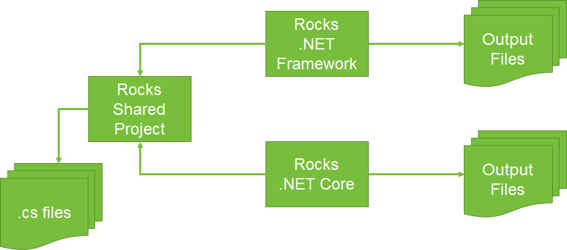
For Rocks, this would mean that the solution would have three projects: the shared project, a .NET Framework project, and a .NET Core project. The same would hold true for the related unit testing project. Therefore, six projects would have to be created and maintained to support two targets. Granted, the target projects are essentially “shell” projects with little or no code, but it would be another maintenance aspect going forward.
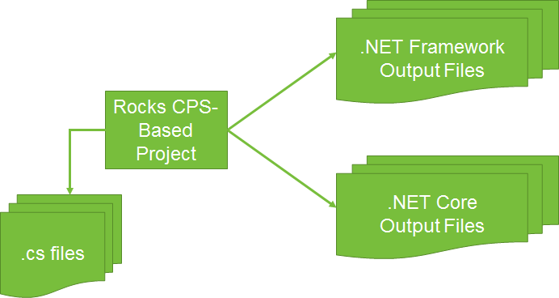
With the new project file format used by .NET Core projects, there’s no longer the need to use shared projects. The <TargetFrameworks> element allows one to specify all the targets they want to have. For example, here is how one states that they want .NET Core and .NET Framework outputs:
<TargetFrameworks>netcoreapp1.1;net462;</TargetFrameworks>
When the project is built, a directory is created for each target as the following figure shows:
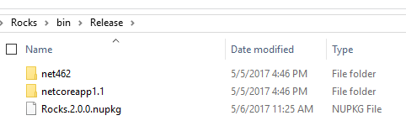
Again, there is only one project needed to support these targets. The following figure illustrates this slimmed-down approach:
To get this new project file created, a developer creates a .NET Core project first:
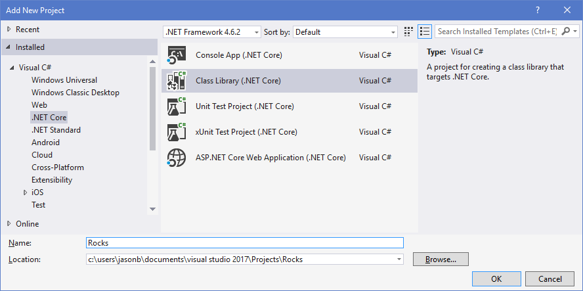
Here’s what the resulting Rocks.csproj file format looks like:
<Project Sdk="Microsoft.NET.Sdk">
  <PropertyGroup>
    <TargetFramework>netcoreapp1.1</TargetFramework>
  </PropertyGroup>
</Project>
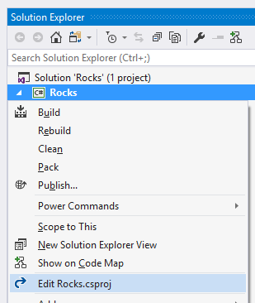
Visual Studio 2017 allows one to edit the project file without having to unload the project, which makes it painless to update the project with any desired changes, such as adding multiple targets, or adding NuGet package references. This is shown in the following image:
Furthermore, the new project format enables NuGet package creation directly. The following figure shows the tab in the project properties window that lets a developer specify NuGet package values:
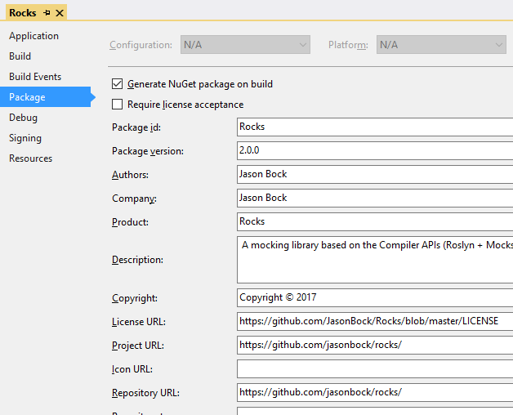
These values translate directly into .csproj elements, such as <PackageLicenseUrl>. It’s no longer necessary to support a separate .nuspec file and package creation step; all of it is done when the project is built.
Because different targets may have different capabilities, preprocessor directives can be used. For example, when Rocks generates a new assembly for a mock type, it uses Assembly.Load() in the .NET Framework. However, this API doesn’t exist in .NET Core, so the AssemblyLoadContext type must be used. Using directives, it’s straightforward to specify which approach should be used depending on the target:
#if !NETCOREAPP1_1
    protected override void ProcessStreams(
      MemoryStream assemblyStream, MemoryStream pdbStream) =>
      this.Result = Assembly.Load(
        assemblyStream.ToArray(), pdbStream.ToArray());
#else
    protected override void ProcessStreams(
      MemoryStream assemblyStream, MemoryStream pdbStream)
    {
      assemblyStream.Position = 0;
      pdbStream.Position = 0;
      this.Result = AssemblyLoadContext.Default
        .LoadFromStream(assemblyStream, pdbStream);
    }
#endif
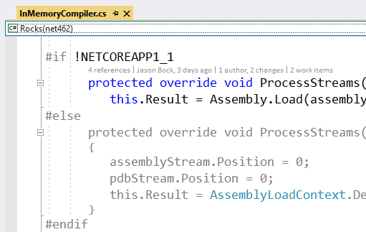
VS 2017 also lets a developer “see” what code applies for a selected target. In the following screen shot, the .NET Framework is specified:
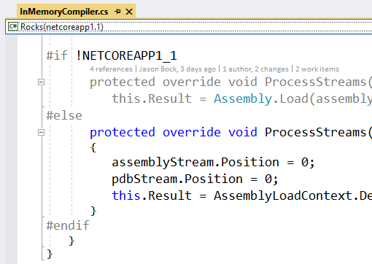
Switching to the .NET Core target, the code is now colored differently:
Note: As of the writing of this white paper, a fair amount of tools and features in VS 2017 do not work with this new project format, such as the Test Explorer, Live Unit Testing, Intellitest, and Code Clones, just to name a few. Tools that do not have this support should be updated in the near future, but be aware that for now, some tools will not work. Follow the release notes for the latest VS 2017 updates.
Conclusion
With Visual Studio 2017, it’s far easier to develop applications and packages in .NET Core. Furthermore, if a code base was written just for the .NET Framework, it’s relatively straightforward to update projects such that they can support .NET Core and the .NET Framework. As more developers move towards supporting .NET Core, it’s imperative to have a simplified model to support as many platform targets as possible. While .NET Standard 2.0 (which will be supported by the .NET Framework, .NET Core and Xamarin) will minimize the different between the platforms, history has shown that new platforms are a distinct possibly. With this approach, developers have the capability to support new targets with potentially reduced effort.
Published: 05.17.2017 01:21 PM CST