Jason Bock
| Home | Biography | Speaking | Articles | Books | Music |
WebAssembly and the Future of Web Development
Synopsis: JavaScript has been the only language for web development for many years. This may change with the coming of WebAssembly. In this article, I’ll briefly discuss my own history with web application development. I’ll focus on how JavaScript usage has change over the years. Then I’ll cover what WebAssembly is and how it works. Finally, I’ll ruminate of what WebAssembly may mean for web developers in the coming years.
How Web Development has Changed
In the 20 years that I’ve been doing software development, I’ve been fortunate to have diverse experiences in the applications that I’ve been a part of creating. From the front end all the way to the database and everything in between, I’ve been able to experience how to get code to do what users needed it to do. That doesn’t mean I’m an expert in every aspect of software development – far from it. However, that experience has been valuable in terms of seeing how software has changed over the years, and this included web development. Here are some tales from applications I was a part of that made me see the possibilities and opportunities in writing web applications.
1997 – Perl
This was the first web application I worked on. To be truthful, I didn’t write any of the web content; my focus was on the shared business logic that both the web middleware and a Windows application written for administrators used. The other developer handled the web content side of things, and he used Perl to do it. I never had to read his code, and he rarely touched my Visual Basic code, but we were able to get both worlds to talk to ensure the timesheet application validated data. It was clunky, it was tricky, and … well, it was Perl, but it handled over 5,000 users who needed to post their time to get paid that week. It was amazing to see an application delivered over the client’s intranet in this fashion. Truth be told, though, I don’t think there was a line of JavaScript in our application. We’d receive the data from the postback, handle all of the validation on the web server, and either return a list of errors or save the information to the database.
2001 – ActiveXObject
I may have just sent shivers up some reader’s spines with that word: ActiveXObject. Some of you may have no idea what I’m referring to. Essentially, ActiveXObject lets you create an object of any type, provided it’s an ActiveX object (more shivers!). This is what I used to create a dynamic page in a web application. This page had 4 drop-down lists, and a selection in one of them changes the values in the ones to the right of that list. We did this by getting a reference to an XMLHttpRequest object via an ActiveXObject wrapper and it’s sad that I remember any of this, because I should have forgotten it by this time! However, that’s what my brain does with useless information. Anyway, it was cool because, by using JavaScript, it added dynamic content to a page where the users really wanted it without having to do a postback to the server. This change made the interaction faster and cleaner.
2003 – Video Handling and Multi-browser Support
This was a fun project. The application allowed users to submit ideas for projects as a video and upload it to the site. A committee reviewed projects and winners would receive a prize to make their ideas reality. They eventually had 1 million visitors in its first month alone. Remember, this was 2003, 2 years before YouTube was even a thing. Trying to get a site to work in IE and Netscape for both Windows and a Mac was frustrating, to say the least. However, after many late nights, I got video uploads and playback to work in all of these versions. JavaScript was definitely a part of this experience, but it still wasn’t an essential part of the whole application.
2005 – Asynchronous Processing
I was on a project for over a year rewriting the main two pages of a client’s web site. That may not sound like much, but these pages received the majority of their traffic and they needed to change their approach and technology choices. One of the biggest changes was a large emphasis on asynchronous processing, both on the server and on the client. Doing this with asynchronous web pages in ASP.NET 2.0 was not trivial, but we got it to work. Furthermore, we did many coordinated JavaScript service requests, dynamically updating page content on the fly (no, we didn’t use ActiveXObject to do this). When the work was completed, the client substantially reduced the amount of servers needed to host the site.
JavaScript Evolution
Up until this point, JavaScript didn’t change (click here for a history of JavaScript), both from a language feature and community support perspective. There wasn’t a plethora of packages in Node yet – heck, Node didn’t even exist yet. This started to change with jQuery, a library that made it easier to handle browser inconsistencies and DOM manipulation. Over time, the community overcame more hurdles and people started working hard to make the web better. Furthermore, JavaScript finally started to see some additions to the language. Now, in 2017, the web is arguably one of the most popular application hosts that developers use to deploy their programs. JavaScript is no longer just a “glue” scripting language for HTML pages; it’s being used in database engines, middleware – frankly, it’s everywhere.
Nevertheless, it’s Still JavaScript!
I like JavaScript. I think it’s a decent language. However, I don’t love it. There are warts, oddities and strangeness to the language that, yes, you can avoid, but you can’t forget about the quirks. While every language has their issues, there are languages that people use that they want to use everywhere. I’m primarily a C# developer, and I feel very comfortable in that world. I’ve talked to developers who use Ruby, Python, and Elixir, just to name a few, that are also very passionate about their syntax of choice and are extremely productive in it. We’d all like to use these languages in the browser … but we can’t. JavaScript is the only language for the web, but people want to use others.
If you want to circumvent JavaScript, you can use a transpiler. There are many transpilers out there for languages that currently exist. Some transpile for languages that have existed for a while, like C# or Ruby. Others were created as brand new languages that generate JavaScript, like TypeScript. TypeScript has become a favorite choice for me (and other developers). You can take a JavaScript file and just rename the extension to “.ts”, and you have a TypeScript file. However, TypeScript bring a whole slew of features for developer to write safe and expressive code. In the end, JavaScript is the result from TypeScript, but TypeScript provides innovation and features missing from JavaScript.
Even with these approaches, you still have to work with JavaScript at some level. For some applications (think games or mathematical calculations), you want to have fast performance that a language like JavaScript just won’t be able to deliver on. Finally, there is a ton of code written in other languages other than JavaScript, and to think that all of that non-JavaScript code will be rewritten in JavaScript just so a company can change their native desktop applications to the web is a little naïve. If the web had a standard, binary format for loading and executing code, then it becomes possible to use other languages in a browser.
Enter WebAssembly.
What Is WebAssembly?
WebAssembly defines a binary format for code to run in the browser. You can visit the WebAssembly site by clicking on the link in the previous section and learn as much as you want about this new standard, but here are the main aspects of WebAssembly:
- Efficient and fast
- Open and debuggable
- Safe
- Part of the open web platform
If you ever heard of asm.js and Emscripten, you can think of WebAssembly as the agreed-upon standard for binary code on the web. At the end of the day, what WebAssembly provides is a structure (WebAssembly files typically have the extension “.wasm”) that you can load in a web page and execute its code.
Sounds interesting? Let’s look at a simple example to see how this works in C. Yes, I said “C” – not C# or Ruby or Python. Why? Because for the first version of WebAssembly (which, at the time of writing this article, has passed the “Browser Preview” milestone), there aren’t a lot of features available that modern languages need, like access to a garbage collector. Compilers for C and Rust already have functionality in place to target WebAssembly, so to show an example of WebAssembly, we have to use a systems programming language. Don’t worry, though – I’ll keep the code nice and simple so the focus will primarily be on WebAssembly itself and not the language of origin.
Here’s the C code we’ll run in the browser:
float multiply(float x, float y) {
  return x * y;
}
Now, if you’re like me, you don’t have a C compiler on your machine. However, if all you want to do is play with WebAssembly, a great site lets you do your compilation in the browser. WasmExplorer is its name, and it looks like this:
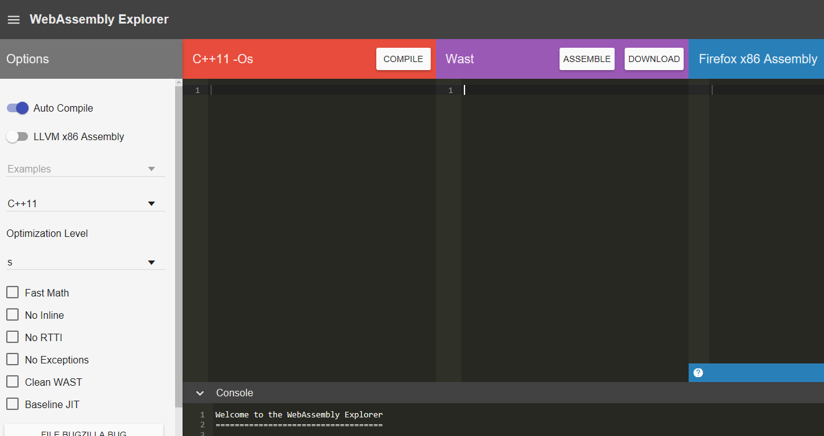
Again, to keep things simple, I’ll copy my multiply() function in the “C++ 11” pane, and then I’ll click on the Compile button in the “C++ 11” pane:
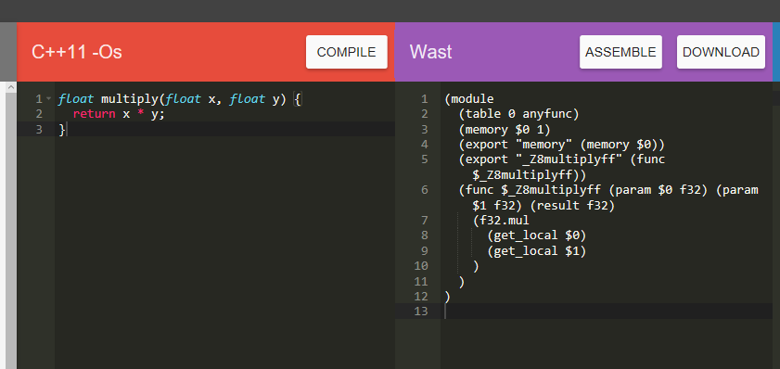
This isn’t quite WebAssembly at this point. What you get is the textural format of the eventual binary output that uses s-expressions, called WebAssembly Text, or Wast. If you’re a .NET developer, think of this format as being similar to the IL that you see in a tool like the Intermediate Disassembler, or ILDasm. Here’s what that looks like for multiply():
(module
  (table 0 anyfunc)
  (memory $0 1)
  (export "memory" (memory $0))
  (export "_Z8multiplyff" (func $_Z8multiplyff))
  (func $_Z8multiplyff (param $0 f32) (param $1 f32) (result f32)
    (f32.mul
      (get_local $0)
      (get_local $1)
    )
  )
)
Even if you’ve never see this format before, you can probably read that code and see a function (denoted with func) that has two parameters. The f32 text means the parameters are a float32 type. It also returns an f32 to the caller. Within the method, it multiplies the two arguments together and returns the result when the method finishes.
Now, why this tool decides to mangle the function name is kind of a mystery to me. Fortunately you can edit any of the Wast, so let’s change the exported name to “multiply”. Then, click the Assemble button – you should see entries in the Console section that state the creation of the .wasm file is complete:
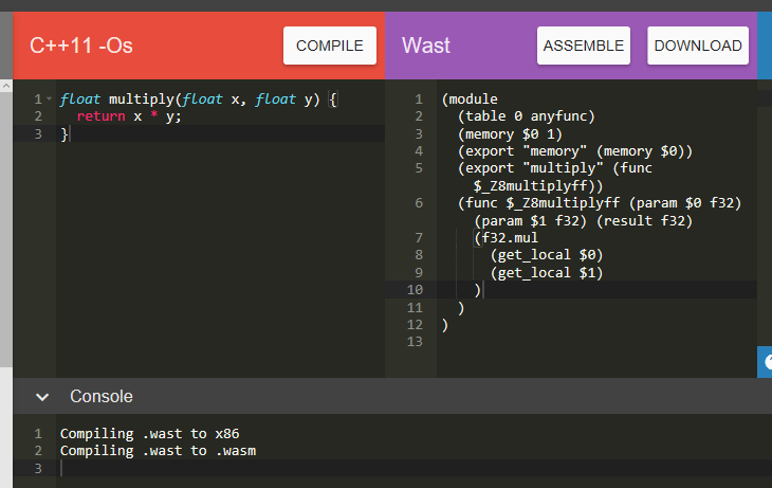
Finally, you can click Download, which will let you get the .wasm file on to your machine.
Now that we have our C code, let’s execute it! Here’s a simple HTML page that will call multiply() when the button is clicked:
<!doctype html>
<html lang="en">
  <head>
    <meta charset="utf-8">
    <title>WebAssembly Demo</title>
  </head>
  <body>
    <button onclick='multiplyClick()'>Multiply!</button>
    <script>
      function multiplyClick() {
        alert(wasmExports.multiply(3, 21));
      }
    </script>
  </body>
  <script>
    // The JavaScript code from the next code snippet goes here...
  </script>
</html>
So what’s wasmExports? That’s an object created when the script for the page executes. Here’s what that looks like (you’d put this within the <script> tag):
var wasmExports;

fetch('examples.wasm')
  .then(response =>
    response.arrayBuffer())
  .then(buffer => {
    let codeBytes = new Uint8Array(buffer);
    try {
      WebAssembly.compile(codeBytes)
        .then(module => {
          let instance = new WebAssembly.Instance(module);
          wasmExports = instance.exports;
        })
    } catch (e) {
      alert("Error: " + e);
    }
  });
Eventually, WebAssembly will allow you to use the same syntax you use in JavaScript to import modules to load .wasm files. For now, you have to do a couple of manual steps to load the .wasm file (fetch()), compile the bytes (WebAssembly.compile()), and then get a reference to the instantiated module (WebAssembly.Instance() and then use the exports property). Once you do that, you can reference the exported functions. Now, you should be able to click the Multiply! button and see the glorious results in an alert window:
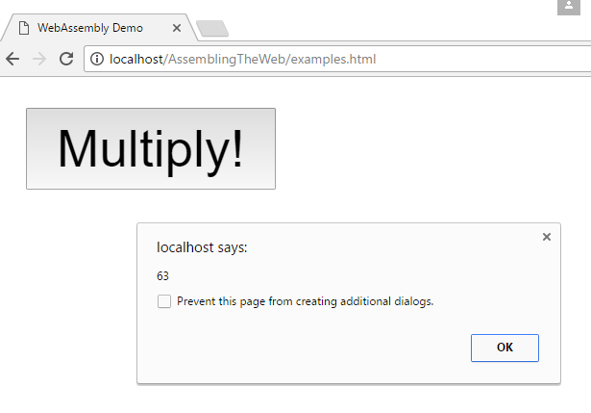
This is C code running natively in the browser. How slick is that?
Now, before you try this on your machine, there’s a couple of things to keep in mind. First, as of the writing of this article, WebAssembly’s initial MVP design has reached consensus and this first version should be shipping in browsers in the near future. However, WebAsssembly doesn’t ship with the latest version of all the modern browsers, such as Chrome, Edge, Firefox and Safari. If you want to try WebAssembly out right now, here’s what you need to do:
- Chrome: Use Chrome Canary, open chrome://flags/#enable-webassembly and enable the switch.
- Edge: Go here for details on using WebAssembly
- Firefox: Use Firefox Nightly, open about:config and set javascript.options.wasm to true.
- Safari: Go here for details on the status of this feature
In addition, I usually run Windows 10, so to get my .wasm file to load in the browser correctly, I configured a web site in IIS and ensured that I had an application/octet-stream MIME type mapping for .wasm files.
The Impact of WebAssembly
It’s encouraging to see the web evolve this way. Providing a standardized code format such that other languages can empower web applications is a fantastic feature. However, keep in mind that right now, the features in WebAssembly are somewhat limited. While languages like C and Rust are targeting WebAssembly, it’s not available for C# … yet. As new features are added in the near future, this should make it possible to target Wasm in C#, though it might be a somewhat limited version where certain language features and/or APIs are not available. It’s just too hard to tell now. There are encouraging developments in the .NET space that C# will at some point work in the browser.
Another potential concern is JavaScript itself. If WebAssembly enables developers to use other languages for web development, will JavaScript’s currently popularity decrease over time? Trying to predict what the software landscape will look like in 5 years with any degree of accuracy is kind of a fool’s game. I will say this: I think having the ability to use other languages will be an enticing feature that developers should keep their eye on. Maybe we’ll see applications written completely in Elixir or C#, maybe we won’t. If WebAssembly enables developers to create fast, stable, maintainable applications in languages that they truly want to use, then I think we’ll see rapid adoption to target WebAssembly. That’s a big “if”, and we just won’t know until WebAssembly has all of the features to enable other languages to target the web.
Conclusion
In this article, you received a brief tour of the evolution of web development. Then, you saw what WebAssembly is and how it currently work. We finished with a discussion of the potential for WebAssembly to change how we write software for the web. Personally, I am extremely excited to see this standard take shape. I would love to write code in C# and have my project emit a .wasm file as its binary result. What do you think? Do you see WebAssembly changing the world, or will it be relegated to small, performance-based corner cases? Let me know by e-mailing me at info@magenic.com – I’d love to hear your opinions on WebAssembly. Until next time, happy coding!
Published: 03.02.2017